How to Sign Up at Cazeus Casino UK and Claim Your New Player Bonus

Registration at Cazeus Casino takes under two minutes. You fill in an email or phone number, choose your country and currency, set a password - and your account is ready. After that you get access to 8,000+ games, welcome bonuses up to 500 EUR plus 200 free spins, live casino tables, sports betting and personal cashier. This guide walks you through every step of the sign up process, explains what documents may be needed later, and shows how to claim your first deposit bonus right after registration.

Casino welcome bonus 100% up to £500 + 200 free spins
Get Startedwith bonus

Why Registration Matters at Cazeus

Without an account you can only browse the lobby. With a registered profile you unlock real-money play, withdrawals, bonus activation and the full VIP programme. Cazeus uses a strict one-account-per-user policy - one account per household, per device cluster, per person. Creating a second account can lead to suspension, so make sure this is your first registration on the platform.

The platform is built for an international audience: the cashier supports EUR, USD, GBP, CAD, AUD, BRL, CZK, HUF, NOK, PLN, NZD, CHF, CLP, PEN and more. You pick your currency at registration and cannot change it later, so choose carefully.

Minimum age to register is 18 years. By submitting the form you confirm that online gambling is legal in your jurisdiction. A list of excluded countries is published in the Terms and Conditions.

Open Registration Form

Where to Find the Sign Up Button

On desktop the Register button sits in the top-right corner of the header, next to the Log In button and the Deposit shortcut. On mobile the same button appears in the top navigation bar. If you land on a regional mirror or alternative domain, the layout is identical - look for the button at the top of the page.

There is no separate app to download for registration. Cazeus runs as a progressive web app (PWA) optimised for mobile browsers. You can add a shortcut to your home screen via the Create Shortcut page for near-native access on both Android and iOS.

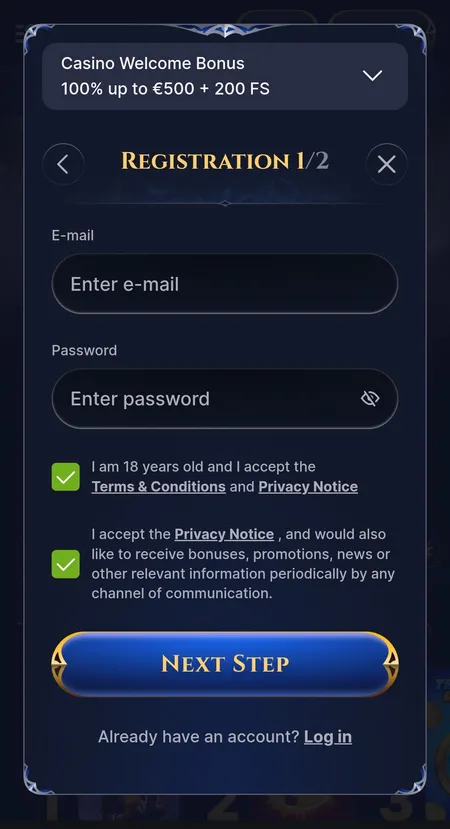
Cazeus Casino registration form step one

Step 1 of 2: email field, password field, 18+ checkbox, marketing consent and Next Step button. The welcome casino bonus banner is visible on the right.

How to Register: Step by Step

The form is split into two short steps.

Step 1

  • Enter your email address or phone number.
  • Create a password (use a mix of letters, numbers and special characters; minimum length is enforced by the form).
  • Tick the 18+ confirmation checkbox.
  • Optionally tick the marketing communications checkbox.
  • Click Next Step.

Step 2

  • Select your country of residence from the dropdown.
  • Choose your account currency (this cannot be changed after registration).
  • Enter a promo code if you have one - this field is optional.
  • Click Create Account.

After submitting, Cazeus may send a confirmation link to your email or an SMS code to your phone. Click the link or enter the code to activate the account. If the message does not arrive within a few minutes, check your spam folder or use the resend option on the confirmation screen.

Once confirmed, you are automatically logged in and land in your personal dashboard where you can make a first deposit, activate a welcome bonus and start playing.

Register at Cazeus

Registration on Different Devices

Device Method Notes
Desktop browser Web form at cazeus.com Full layout, easiest to fill in
Mobile browser Responsive web form Same two-step process
Android PWA Add to Home Screen shortcut Opens like a native app
iOS PWA Add to Home Screen via Safari Same experience as Android

There is no listing in Google Play or the App Store. The PWA shortcut gives you push-style access without any store download. More details are on the Cazeus Casino application page.

What Happens After Registration

Your first action should be visiting the Cashier to make a deposit. The minimum deposit for most payment methods is 10 EUR. To qualify for the welcome casino bonus you need a first deposit of at least 20 EUR - this is a separate condition from the general cashier minimum.

At the Choose Your Welcome Bonus screen that appears on first login you can pick:

  • Casino bonus: 100% up to 500 EUR plus 200 free spins (wagering 35x on deposit and bonus, free spin winnings 40x, 10-day deadline).
  • Sports bonus: 100% up to 100 EUR (or up to 200 EUR for players from Finland, Germany, Norway, Switzerland, Austria), wagering 6x on single bets at odds 2.00 or higher.
  • Enter a promo code for a different offer.
  • Decline the welcome bonus entirely.

Activate your chosen bonus in the My Bonus section of your profile before you start playing. The maximum bet while a casino bonus is active is 5 EUR per spin or round.

For full details on all promotions visit the Cazeus Casino bonuses page.

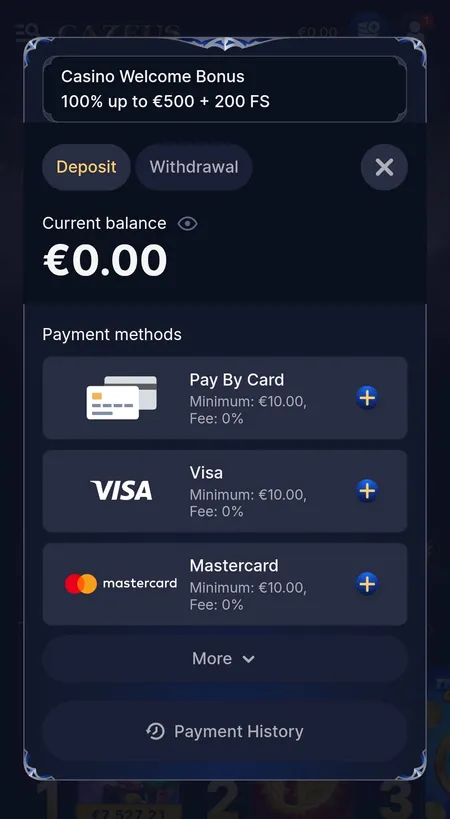
Cazeus cashier deposit tab with payment methods

The Deposit tab shows available payment methods, minimum amounts, zero commission and the welcome bonus banner.

Claim Your Welcome Bonus

KYC Verification After Registration

Registration itself requires no documents. However, KYC verification is triggered before your first withdrawal or when your cumulative activity crosses certain thresholds set by AML policy.

Documents typically requested:

  • Government-issued photo ID (passport, national ID card or driving licence).
  • Proof of address dated within the last three months (utility bill, bank statement).
  • Payment method confirmation (card photo or e-wallet screenshot, depending on the method used for deposit).

Standard review time after submitting a full document set is 24 to 48 hours. In complex cases it may take longer. Submitting clear, unedited scans speeds up the process. Until KYC is complete, withdrawal requests remain on hold.

All data is protected by SSL encryption and processed under the platform's Privacy Policy. Cazeus applies standard KYC and AML procedures in line with its licensing requirements under PAGCOR.

Account Security and Profile Settings

After registration you can strengthen your account in the Security section of the personal cabinet:

  • Change your password at any time.
  • Set up two-factor authentication for login.
  • Review trusted devices and active sessions.
  • Configure deposit limits, session time limits and other responsible gaming tools.
  • Request self-exclusion through the support team if needed.

If you ever have trouble logging in, clear your browser cache and cookies, try a different browser, or check that you are using the correct email. If the issue persists, contact live chat support with a description of the error message you see.

The Cazeus Casino home page at cazeus.com gives you a full overview of the platform before you decide to register.

Cazeus processes KYC documents within 24 to 48 hours in standard cases. SSL encryption is active on all pages. The one-account rule protects your profile from duplication issues.

Currency selection is permanent after registration. Some games and payment methods may be unavailable depending on your country. Always confirm that online gambling is legal in your jurisdiction before signing up.

Registration FAQ

What information do I need to register?

You need a valid email address or phone number, a password, your country of residence and your preferred account currency. A promo code field is optional.

Can I register from a mobile device?

Yes. The registration form is fully responsive and works in any mobile browser. You can also add a PWA shortcut to your home screen for faster access.

What is the minimum age to create an account?

You must be at least 18 years old. By ticking the age confirmation checkbox you declare that you meet this requirement.

How long does email or phone confirmation take?

Confirmation messages usually arrive within a few minutes. If you do not receive one, check your spam folder or use the resend option on the confirmation screen.

Can I change my account currency after registration?

No. Currency is set at registration and cannot be changed. Choose carefully before completing step two of the form.

What documents are needed for KYC?

Typically a government-issued photo ID, proof of address and proof of payment method. The exact list depends on your region and withdrawal amount.

How do I activate the welcome bonus?

After your first deposit of at least 20 EUR, go to My Bonus in your profile and activate the offer before playing.

What should I do if registration fails?

Check that your email or phone is not already registered, that your password meets the minimum requirements and that your internet connection is stable. If the problem continues, contact live chat support.

Is there a limit on the number of accounts per person?

Yes. Cazeus enforces a strict one-account rule per person, per household and per device cluster. Creating a second account may result in suspension.

How do I self-exclude or set deposit limits?

Visit the Security or Responsible Gaming section of your profile. For self-exclusion, contact the support team directly via live chat or email.

Your Cazeus account is one form away. Register now, pick your welcome offer and explore 8,000+ games, live casino and sports betting.