Cazeus Casino UK Mobile App — Download for Android and Bet on the Go

Cazeus Casino does not offer a standalone app in the Google Play or App Store - instead the platform delivers a fully optimised mobile browser experience and a PWA shortcut that puts the casino, live tables and sportsbook one tap from your home screen. No installation from an app store required, no version updates to approve manually, and the same account works across all devices.

Casino welcome bonus 100% up to £500 + 200 free spins
Get Startedwith bonus

Why Use the Mobile Version of Cazeus

The mobile-optimised site loads in a standard browser and covers every section available on desktop: Casino, Live Casino, Sports, Bonuses, Challenges, Tournaments and the Shop. The interface adapts automatically to your screen size, so navigation menus collapse into a compact bottom bar with quick access to Live Chat and the language switcher.

The PWA shortcut (explained below) adds a launch icon to your home screen and opens the site in full-screen mode without browser navigation bars - giving a near-native look and feel without requiring you to trust a third-party APK or bypass app store restrictions.

Key practical advantages over a desktop session:

  • Instant access from the home screen via shortcut
  • Full casino, live and sports functionality in one interface
  • SSL-encrypted connection identical to the desktop version
  • Touch-optimised lobby with swipe navigation between game categories
  • Bottom navigation bar with Deposit, Live Chat and Language buttons always visible
Try Cazeus on Mobile

How to Create a Shortcut (PWA) on Android and iOS

Cazeus provides a dedicated 'Create Shortcut' page with step-by-step instructions for both platforms. The process takes under a minute.

Android (Chrome or any Chromium browser)

  1. Open the Cazeus Casino website in Chrome.
  2. Tap the three-dot menu in the top-right corner.
  3. Select 'Add to Home Screen'.
  4. Confirm the name and tap 'Add'.
  5. The Cazeus icon appears on your home screen and launches in full-screen mode.

iOS (Safari)

  1. Open the Cazeus Casino website in Safari.
  2. Tap the Share button (rectangle with arrow) at the bottom of the screen.
  3. Scroll down and tap 'Add to Home Screen'.
  4. Confirm the name and tap 'Add'.
  5. The shortcut icon appears and opens the site without the Safari address bar.

No APK file, no side-loading, no system permissions needed. If you previously bookmarked the site in a browser, delete that bookmark and use the shortcut instead - the difference in launch speed and screen usage is noticeable.

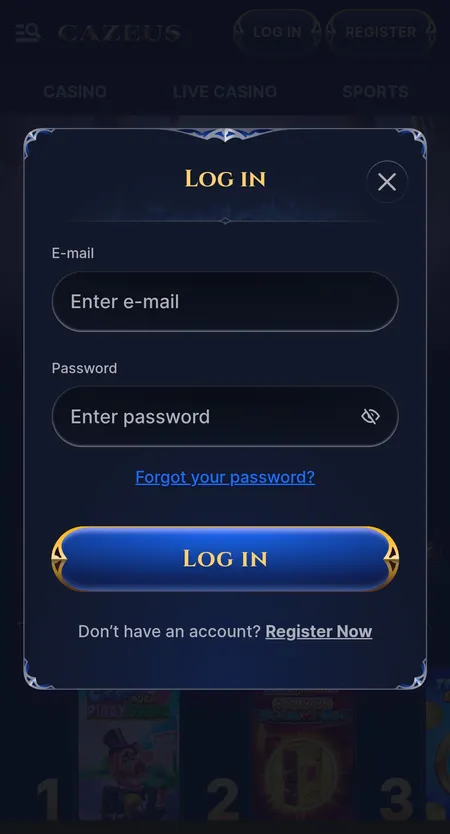
Cazeus Casino mobile login screen

Login modal on mobile: email, password fields and password recovery link - identical on all devices.

System Requirements and Compatibility

Because Cazeus runs in a browser rather than a native app, the requirements are minimal.

Parameter Android iOS
Browser Chrome 90+ / any Chromium Safari 14+
OS version Android 8.0 or higher iOS 14 or higher
RAM 2 GB minimum 2 GB minimum
Storage Under 50 MB (cache only) Under 50 MB (cache only)
Connection 3G minimum, 4G or Wi-Fi recommended 3G minimum, 4G or Wi-Fi recommended

Live casino streams and in-play sports require a stable 4G or Wi-Fi connection for smooth performance. Older Android devices on version 7 or below may encounter display issues in the live lobby.

Registration Inside the Mobile Interface

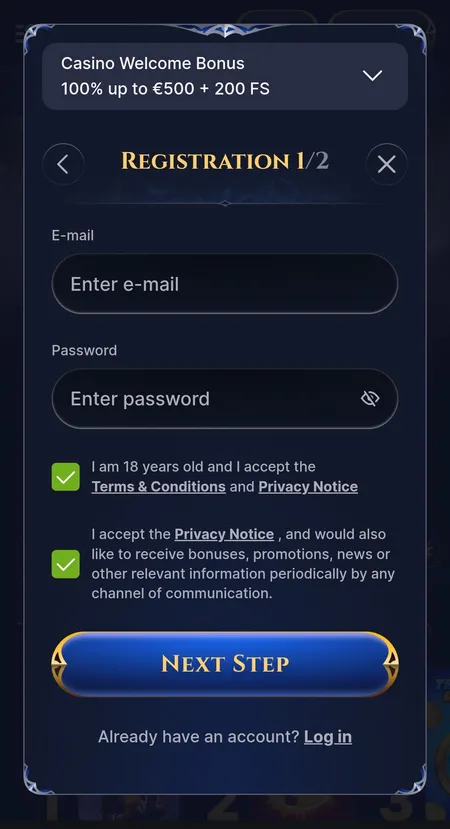
Creating an account from a mobile device follows the same two-step flow as desktop. On the first screen you enter your email address and choose a password. On the second screen you select your country of residence and account currency - this choice is permanent, so pick the currency you intend to use for deposits and withdrawals.

When you first log in, a modal window asks you to choose your welcome bonus: casino (100% up to 500 EUR plus 200 free spins), sports (100% up to 100 EUR), enter a promo code, or decline. You can only have one account per household under Cazeus terms, so if you are registering on a shared device, make sure no account already exists for your details.

For the welcome casino bonus, the minimum qualifying deposit is 20 EUR (or equivalent in your account currency). The bonus activates in the 'My Bonus' section of your profile after depositing.

Register at Cazeus
Cazeus Casino registration step 1 on mobile

Registration step 1: email, password, age confirmation checkbox and welcome bonus banner.

Bonuses Available in the Mobile Version

All promotions from the Cazeus Casino bonuses page are fully accessible on mobile - there are no mobile-exclusive offers or desktop-only restrictions.

Current promotion highlights:

Promotion Offer Wagering
Welcome Casino 100% up to 500 EUR + 200 FS 35x (deposit + bonus)
Welcome Sports 100% up to 100 EUR 6x deposit + bonus
Weekend Reload 50% up to 800 EUR + 80 FS -
Daily Cashback Up to 15% -
Live Cashback Up to 25% -

Free spins from the welcome package are distributed in daily batches (20 per day). Maximum stake with an active bonus is 5 EUR. Winnings from free spins carry a separate 40x wagering requirement. The 10-day countdown starts from the moment the bonus is activated, not from when the deposit is made.

VIP programme spans 5 levels and unlocks higher withdrawal limits, increased cashback rates and a personal account manager at the top tiers. Progress is tracked in the profile section and visible on mobile without any additional steps.

Sports Betting on Mobile

The Sports section on mobile is divided into three subviews: IN PLAY, POPULAR BETS and UPCOMING. A horizontal scroll bar at the top lets you switch between sports (Football, Basketball, Tennis, Esports and others) with match counts displayed next to each label.

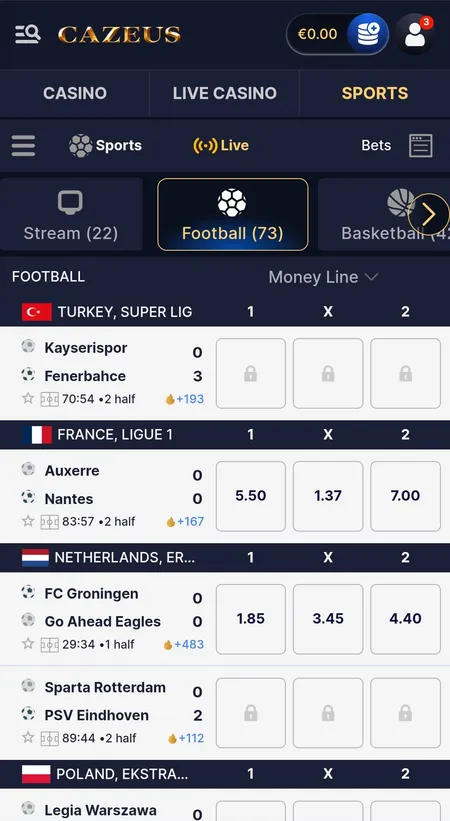
Live matches show real-time score, period or quarter, and elapsed time. Odds are displayed in decimal format. Some markets may show a lock icon when they are temporarily suspended during a live event.

Pre-match lines cover major competitions including Premier League, La Liga, Eredivisie and others. Combination bets, odds boosts and a 10% sports cashback up to 500 EUR are available. The dedicated sports welcome bonus requires minimum odds of 2.00 for singles and 1.50 per selection in accumulators.

Cazeus Casino live sports betting mobile view

Live sports section: match list with Money Line odds, score display and real-time timer.

Place a Bet at Cazeus

Casino and Live Games on Mobile

The full game library - estimated at 8,000 to 12,000 titles depending on your region - is accessible on mobile. Categories in the lobby: Top, New, Popular, Megaways, Bonus Buys, Slots, Table Games. The Jackpots section covers Hot Jackpots, New Jackpots, Drops and Wins and Daily Jackpots.

Providers with the largest catalogues in the mobile lobby include Spinomenal (753 titles), Yggdrasil (481), Fazi (449), Voltent (416), Amusnet (345) and Red Tiger (329). Games like Gates of Olympus, Sweet Bonanza and Temple Tumble Megaways load directly in the mobile browser without plugins.

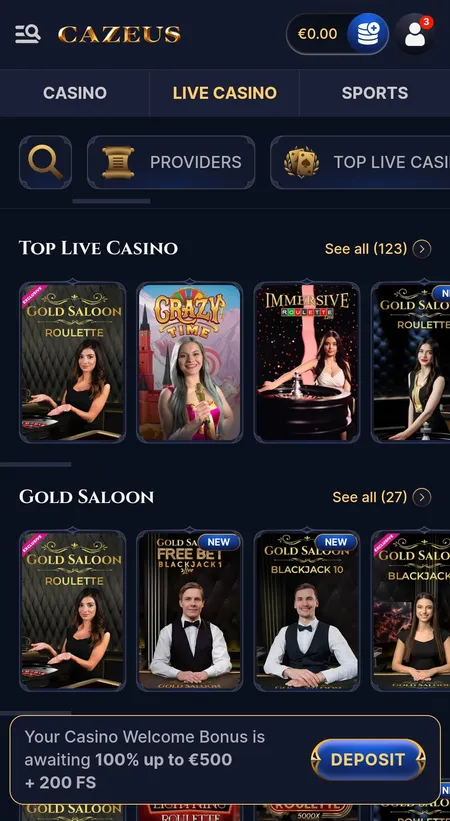
The Live Casino lobby on mobile shows dedicated rows for Gold Saloon, Roulette, Blackjack, Baccarat, Game Shows and Poker. Evolution Gaming and Pragmatic Play Live tables stream in real time; video quality adjusts automatically based on connection speed.

Many titles support Demo mode (availability depends on region and provider). RTP values for slots typically sit between 94% and 97% and are listed in individual game cards.

Cazeus Casino live casino mobile lobby

Live Casino mobile lobby: Gold Saloon and Top Live Casino rows with roulette and Crazy Time previews.

Deposits and Withdrawals on Mobile

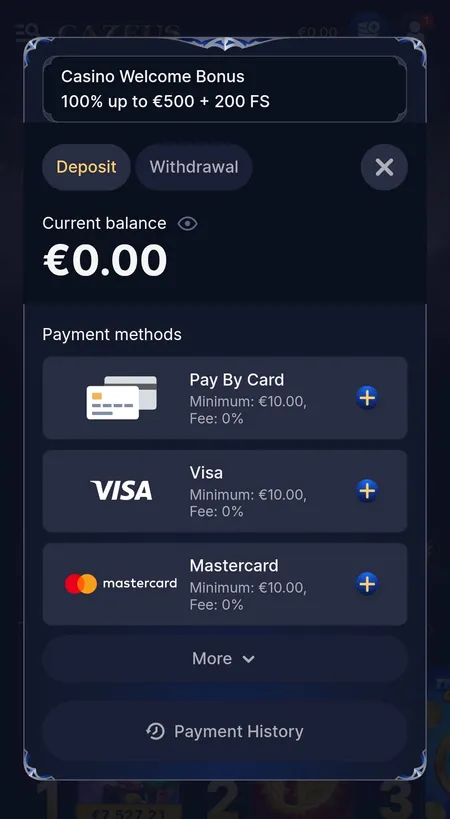
The Cashier is accessible from the Deposit button in the header or from the profile menu. Two tabs: Deposit and Withdrawal.

Method Min Deposit Min Withdrawal Max Withdrawal
Visa / Mastercard 10 EUR 10 EUR 3,000 EUR
Skrill / Neteller 10 EUR 10 EUR 5,000 EUR
Bitcoin 30 EUR 60 EUR 5,000 EUR
USDT / USDC / other crypto 10 EUR 10 EUR 5,000 EUR
Bank Transfer 10 EUR 10 EUR 5,000 EUR

All methods carry 0% commission on both deposits and withdrawals. Deposits are credited quickly; if funds do not appear within 2 hours, contact support via Live Chat. Withdrawal processing takes up to 3 business days; bank transfers may add a further 3-5 days. Withdrawal requests require completed KYC verification - document review typically takes 24-48 hours after the full set of documents is submitted.

For full details on supported payment options, see the Cazeus Casino payment methods page.

Cazeus Casino cashier deposit screen

Deposit tab in the Cazeus cashier: available methods, minimums, 0% commission and welcome bonus banner.

Make a Deposit at Cazeus

Security on Mobile

Cazeus uses SSL encryption on all connections, including the mobile browser and PWA shortcut. Account protection follows standard KYC and AML procedures: identity document, proof of address and payment confirmation may be requested, particularly before large withdrawals or when transaction thresholds are reached.

Session management is handled server-side. If you lose your phone or suspect unauthorised access, contact support immediately to suspend the account. Password recovery is available from the login modal by entering your registered email address.

The platform uses a certified RNG for all slot and RNG table game outcomes. Server-side data takes priority in any disputed result - this applies to slots, table games and the Wheel of Fortune mechanic.

Responsible gaming tools including deposit limits, stake limits and self-exclusion are accessible through the support team. Players in the UK are advised to check the UKGC public register and use GAMSTOP where appropriate. Minimum age to play is 18.

FAQ

Is there a native Cazeus Casino app for Android or iOS?

No. Cazeus does not publish a native app on Google Play or the App Store. The platform provides a mobile-optimised website and a PWA shortcut that can be added to your home screen for a near-native experience.

How do I install the Cazeus shortcut on Android?

Open the Cazeus website in Chrome, tap the three-dot menu, select 'Add to Home Screen' and confirm. The icon appears on your home screen and launches the site in full-screen mode.

How do I add Cazeus to the iOS home screen?

Open the site in Safari, tap the Share button, select 'Add to Home Screen' and confirm the name. The shortcut works like an app icon and opens without the Safari navigation bar.

What Android version is required?

Android 8.0 or higher with Chrome 90 or a Chromium-based browser. Older versions may experience display issues.

Can I register and verify my account from a phone?

Yes. Registration, KYC document upload and all account management functions are fully available in the mobile browser. The two-step registration form and document submission work identically to desktop.

Are bonuses available on mobile?

All bonuses including the welcome package (100% up to 500 EUR plus 200 free spins for casino, 100% up to 100 EUR for sports), reload offers, cashback and VIP rewards are fully accessible on mobile with no restrictions.

What payment methods work on mobile?

All methods in the Cazeus cashier are available on mobile: Visa, Mastercard, Skrill, Neteller, MiFinity, Paysafecard, Revolut, bank transfer and a wide range of cryptocurrencies including Bitcoin, USDT, Ethereum and others.

How long does withdrawal processing take?

Withdrawal requests are processed within up to 3 business days. Bank transfers may add a further 3-5 days. KYC verification must be completed before withdrawals are released.

Does the mobile version support live casino and sports?

Yes. The full Live Casino lobby with Evolution Gaming and Pragmatic Play Live tables, and the complete sportsbook with pre-match and in-play betting, are available on mobile.

What should I do if the site does not load correctly on my phone?

Clear your browser cache and cookies, try a different browser or switch between Wi-Fi and mobile data. If the issue persists, contact Cazeus support via Live Chat with a description of the error and your device model.

Access the full Cazeus Casino experience from your phone - casino, live tables and sports in one place.